Basic HTML Version



U.9
U.9
U.9
U.9
U.9
U.9
23
Install French 1*
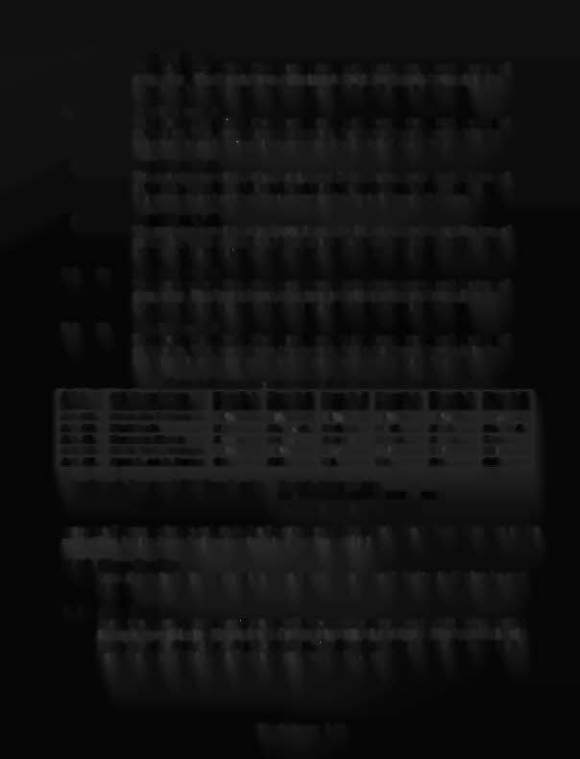
The operator uses this adjustment to modify the game pricing and the type of
game play. The Preset Game Adjustments Table for French Games lists the
adjustments and settings that comprise the 'Install French l' Group.
Install French
2*
The operator uses this adjustment to modify the game pricing and the type of
game play. The Preset Game Adjustments Table for French Games lists the
adjustments and settings that comprise the 'Install French 2' Group.
Install French
3*
The operator uses this adjustment to modify the game pricing and the type of
game play. The Preset Game Adjustments Table for French Games lists the
adjustments and settings that comprise the 'Install French 3' Group.
Install French
4*
The operator uses this adjustment to modify the game pricing and the type of
game play. The Preset Game Adjustments Table for French Games lists the
adjustments and settings that comprise the 'Install French 4' Group.
Install French
5*
The operator uses this adjustment to modify the game pricing and the type of
game play. The Preset Game Adjustments Table for French Games lists the
adjustments and settings that comprise the 'Install French 5' Group.
24
25
26
Z7
28
Install French
6*
The operator uses this adjustment to modify the game pricing and the type of
game play. The Preset Game Adjustments Table for French Games lists the
adjustments and settings that comprise the 'Install French 6' Group.
Pr
Ad' t
t £
Fr
hG
tG
ese arne us men s or enc ames
Adj
#
Adj Description
French 1 French 2 French
3
French 4 French 5 French 6
U.9
23 U.924
U.925
U.926
U.927
U.928
A.2 03 Extra Ball Percent
12% 8%
12% 12% 12% 10%
A.206 Kickback
Hard
Ex. Hard Medium Hard
Hard
Ex. Hard
A.2
11
Freeway Timer
8 sees.
6 sees.
10 sees.
8 sees.
8 sees.
7 sees.
A.2 13 Multi-ball Percent
18% 14%
200/0
18% 18% 16%
A.2 17 Spot L. on S. Ramp
On
01T
On
On
On
Off
*
For French Jumpered
CPU
Boards only.
French Jumpers are:
Wl4 Wl5 W16 Wl7
W18
In In In
Out
In
Press the Escape button to return to the Presets menu. Then press the Up button to display the
next utility, (or the Down button to return to a previous utility).
U.I0 Clear Credits
Press the Enter button to clear the game Credits. Press the Up button to display the next
utility.
U.11 Auto Bum-in
Press the Enter button to activate Auto Burn-in. This allows you to automatically cycle
through several tests. This helps in finding intermittent problems. The tests that Auto
Burn-in cycles through are the Display Test. the Sound and Music Test, the All Lamps
Test, the Solenoid Test, the Flashers Test. and the G.I. Test.
The
Getaway 1-24